
How to integrate WhatsApp OTP API for your business
If you want to send OTPs through WhatsApp, you’ll need to use the WhatsApp Business API. Here’s how you can do it:
1. Prerequisites
Before you start, make sure you have:
- Omnihus Account & Project
- An active Omnihus account.
- WhatsApp channel enabled for your project.
- API Base URL
- {{OMNIHUS_BASE_URL}}
- API Key
Obtain your Omnihus API key from the dashboard:{{YOUR_API_KEY}}
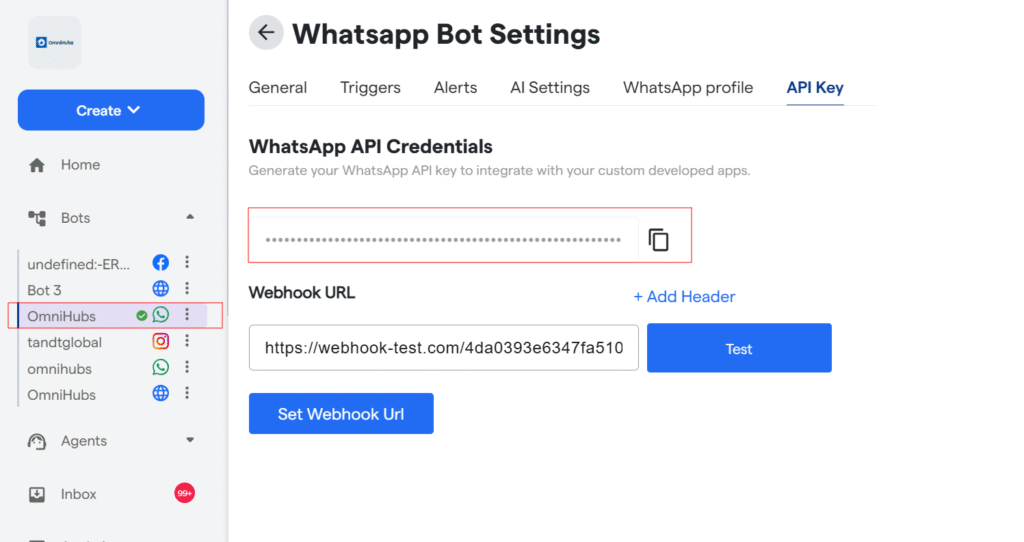
5. WhatsApp Sender Number (From Omnihus)
This is configured in Omnihus (the number users see as the sender), e.g.:+1234567890
6. OTP Template (in Omnihus)
In Omnihus dashboard, create or use an existing template such as:
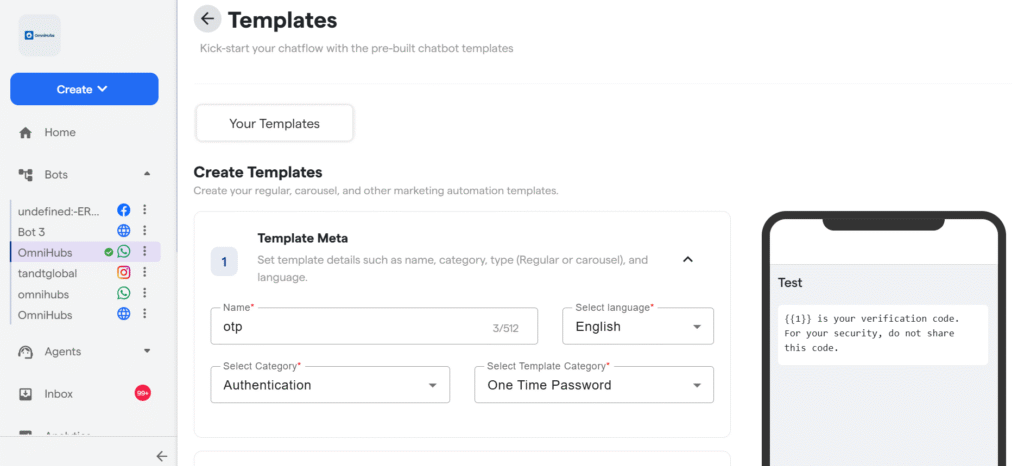
Note the template ID: {{WHATSAPP_TEMPLATE_ID}}
API End Point
Base URL
https://api-v7.express-chat.com/whatsapp-automation/wa/send-template?apiKey=*API KEY*
Examples
Request
Base URL
 curl --location 'https://api-v7.express-chat.com/whatsapp-automation/wa/send-template?apiKey=*Api Key*\
--header 'apiKey: *ApiKey* \
--header 'Content-Type: application/json' \
CURL– Send OTP
Curl
 --data '{
    "wa_id": "965xxxxxxxx",
    "userName": "yyy",
    "templateId": "69258725d8410c919e18acec",
    "params": [
        {
            "type": "body",
            "parameters": [
                {
                    "text": "9981899",
                    "type": "text"
                }
            ]
        },
        {
            "type": "button",
            "sub_type": "url",
            "index": 0,
            "parameters": [
                {
                    "text": "9981899",
                    "type": "text"
                }
            ]
        }
    ]
}'


