
How to integrate WhatsApp Invoice Pdf API for your business
If you want to send PDFs through WhatsApp, you’ll need to use the WhatsApp Business API. Here’s how you can do it:
What is WhatsApp Invoice Integration?
WhatsApp Invoice Integration is a system that automatically sends a PDF invoice to a customer’s WhatsApp number using the WhatsApp Business API.
Instead of sending invoices through email or SMS, businesses use WhatsApp because it is faster, more reliable, and more user-friendly.
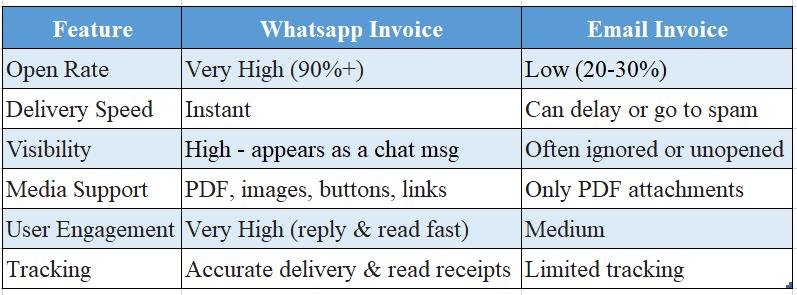
Why send invoices through WhatsApp?
- Instant delivery
- Guaranteed visibility
- Higher conversion
Comparison: WhatsApp Invoice vs Email Invoice
1. Prerequisites
Before you start, make sure you have:
- Omnihus Account & Project
- An active Omnihus account.
- WhatsApp channel enabled for your project.
- API Base URL
- {{OMNIHUS_BASE_URL}}
- API Key
Obtain your Omnihus API key from the dashboard:{{YOUR_API_KEY}}
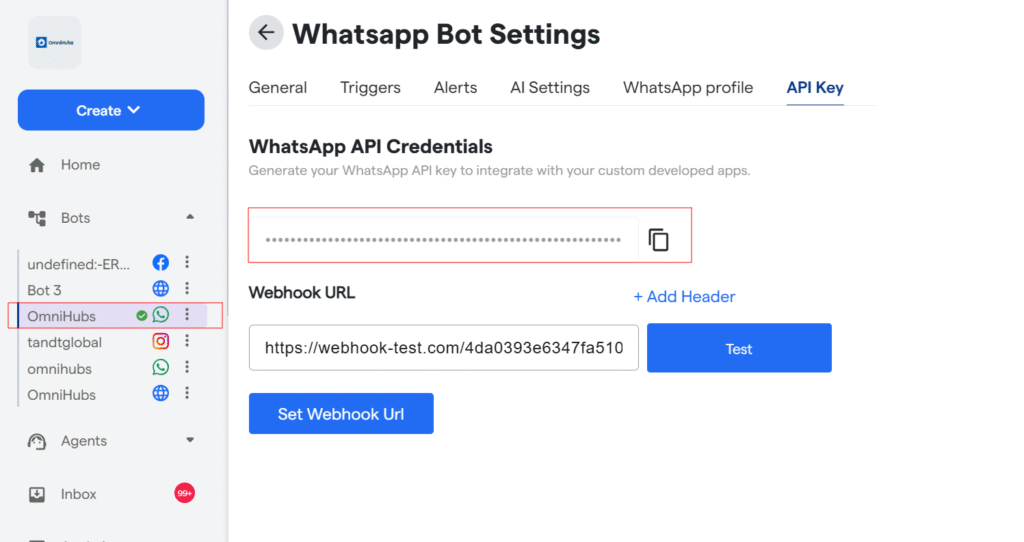
5. WhatsApp Sender Number (From Omnihus) This is configured in Omnihus (the number users see as the sender), e.g.:+1234567890 6. OTP Template (in Omnihus) In Omnihus dashboard, create or use an existing template such as:
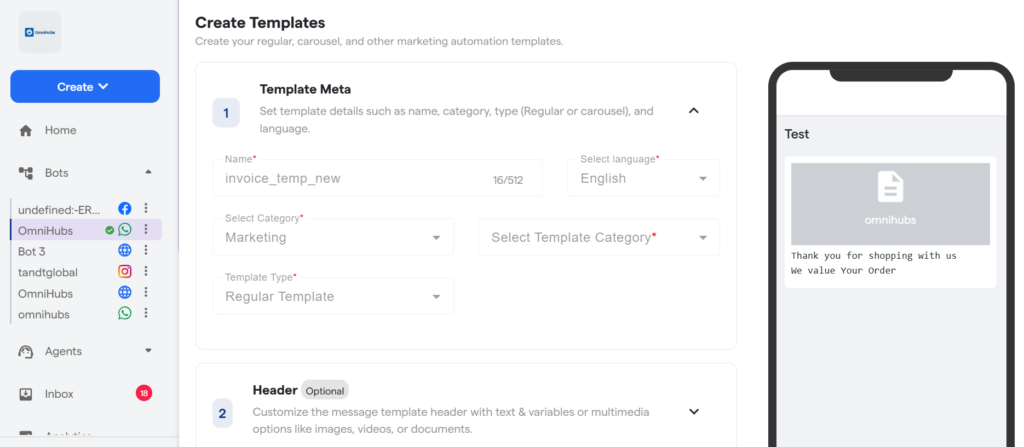
Note the template ID: {{WHATSAPP_TEMPLATE_ID}}
API End Point
Base URL
https://api-v7.express-chat.com/whatsapp-automation/wa/send-template?
apiKey=*API KEY*
Example
Request
curl
curl --location 'https://api-v7.express-chat.com/whatsapp-automation/
wa/send-template?apiKey=*Api Key*\
--header 'apiKey: *ApiKey* \
--header 'Content-Type: application/json' \
CURL– Send Invoice
curl
--data '{
    "wa_id": "965XXXXXXXX",
    "userName": "YYY",
    "templateId": "692e94fb40a646acd616858f",
    "params": [
        {
            "type": "Header",
            "parameters": [
                 {
                            "type": "document",
                            "document": {
                            "link": "https://omnihubs.io/
                            Demo/omnihubs_invoice.pdf"
                            }
                 }
            ]
        }

    ]
}'


