Getting Started 🏠 Introduction 🌂 System Requirements & Setup Checklist 📒 Omnihubs Resource Centre 🏃♂️ How Omnihubs works? Onboarding Create new chatbot Website Chatbot Whatsapp Chatbot Facebook Chatbot Instagram Chatbot Telegram Chatbot Landing Page Chatbot Edit Your Chat Flow Multiple Flows All Components Request Information Send Information Trigger Actions Integrations Component Automation Widget WhatsApp Template Setup Whatsapp Catalog Setup Whatsapp Flows Forms Setup Whatsapp Broadcast Setup Whatsapp Drip Campaigns Setup Facebook Auto Reply Feature Bot Settings Website Chatbot Settings Design Customize Landing Page Bot General Alerts Triggers User Access Chat Window Transfer Chat to Whatsapp Functionality whatsapp-chatbot-settings General Alerts WhatsApp Profile 3rd Party Apps Integrations ChatGPT Facebook Chatbot Settings Instagram Chatbot Settings Telegram Chatbot Settings General Telegram Profile Inbox Chats window Orders Groups Importing WhatsApp Contacts Creating Segments Using Tags My Account Account-setting Password Settings Creating and Managing Teams Creating and Managing Roles Using Teams in Chatflow 3rd-party-apis Integrations ChatGPT 🤖 Creating AI agents in Omnihubs ⚙️ Setting Up Your AI Agent Setting Up Your AI Agent: Guidelines and Best Practices Basic Configuration Prompt Style API Request Tool Communication Style Meta Data Agent Profile Setup: Core Instructions & Best Practices Subscription Subscription Plans Pricing-FAQ’s ❓ Frequently asked questions (FAQs) Onboarding FAQs Edit your chat flow Bot Installation FAQs Inbox FAQs Profile, Team & Notifications FAQs Analytics FAQs Chat Flow FAQs Bot Settings FAQs WhatsApp FAQs Subscription FAQs ChatGPT FAQs 🛠️ Common Errors & Troubleshooting 📖 Platform Guidelines & Training 👩💻 WhatsApp Cloud API by Meta ⚙️ Setting Up Your Facebook Business Manager 💰 Meta Conversation Pricing for WhatsApp Cloud API 👧 Update WhatsApp Bot Profile ✅ Getting a Blue Tick(previously Green Tick) on WhatsApp 🛠️ Api Documentation 📄 Contacts & Chats APIs GET — Segments / Groups GET — Chats / Leads Listing POST — Add WhatsApp Contact Delete WhatsApp Contact Website Contacts & Meta Data 📄 WhatsApp Cloud API GET Templates List POST WhatsApp Template Message POST Send Message API Whatsapp API Integeration Guide Integrate WhatsApp OTP Integrate Whatsapp Invoice Auction Alert WhatsApp Integration Developers Guide API Access Token
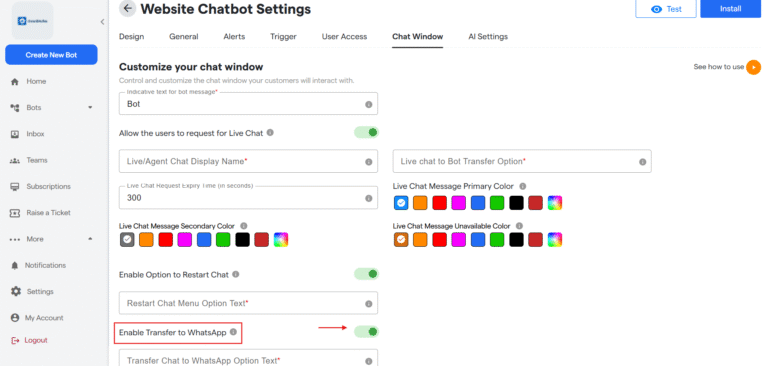
This page contains step by step tutorial on how to use transfer chat to WhatsApp functionality.
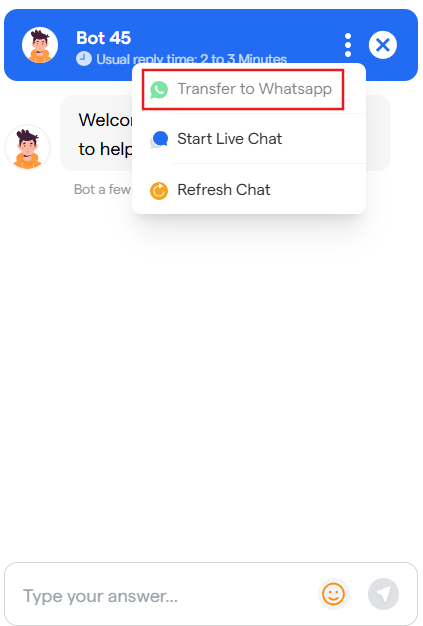
5.Now while chatting with a Website bot, user can click on three dots and select “Transfer to Whatsapp”. As shown below
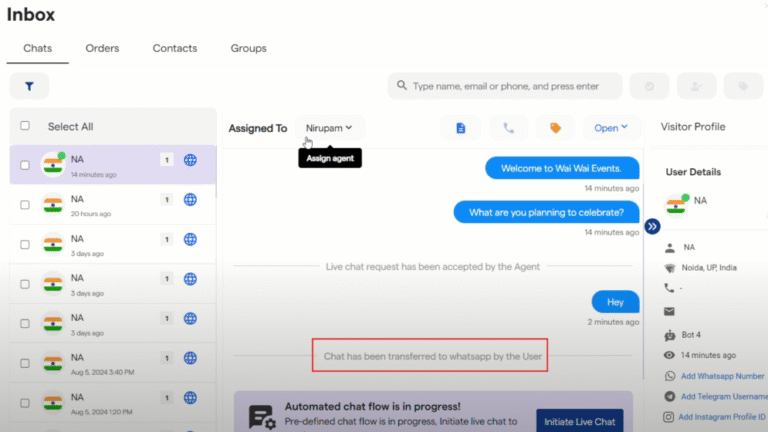
6. In the Inbox, a message will be shown indicating that chat has been transferred to whatsapp by the user.
Done! You have completed setting up Transfer Chat to WhatsApp Functionality.
If everything is correct and you are still unable to move forward, write to us at info@tandtglobal.net. We will respond back within 48 business hours.